
How to keep your project memory accurate
dist0 keeps a short memory of your product, competitors, and audience, and your brief gets sharper as it improves. Here's how to see what it knows and correct it.
Last updated July 13, 2026
On this page
What is project memory?
Project memory is the short profile dist0 keeps of your business. It's how we know which Reddit conversations are worth surfacing for you and not for someone else selling something different.
You never fill it in by hand. When you connect your website, dist0 reads the site, works out what you sell and who you sell to, and writes the profile for you — along with a starter set of subreddits to watch. From then on, every brief is filtered against this memory, so the more accurate it is, the more relevant your pains become.
Memory is your settings, not your results. It shapes what dist0 looks for. The pains, competitor mentions, and briefs you get are separate. Editing memory changes future briefs. It doesn't rewrite the ones you already have.
What does dist0 remember?
You can see the whole profile in the dashboard, on your project page.
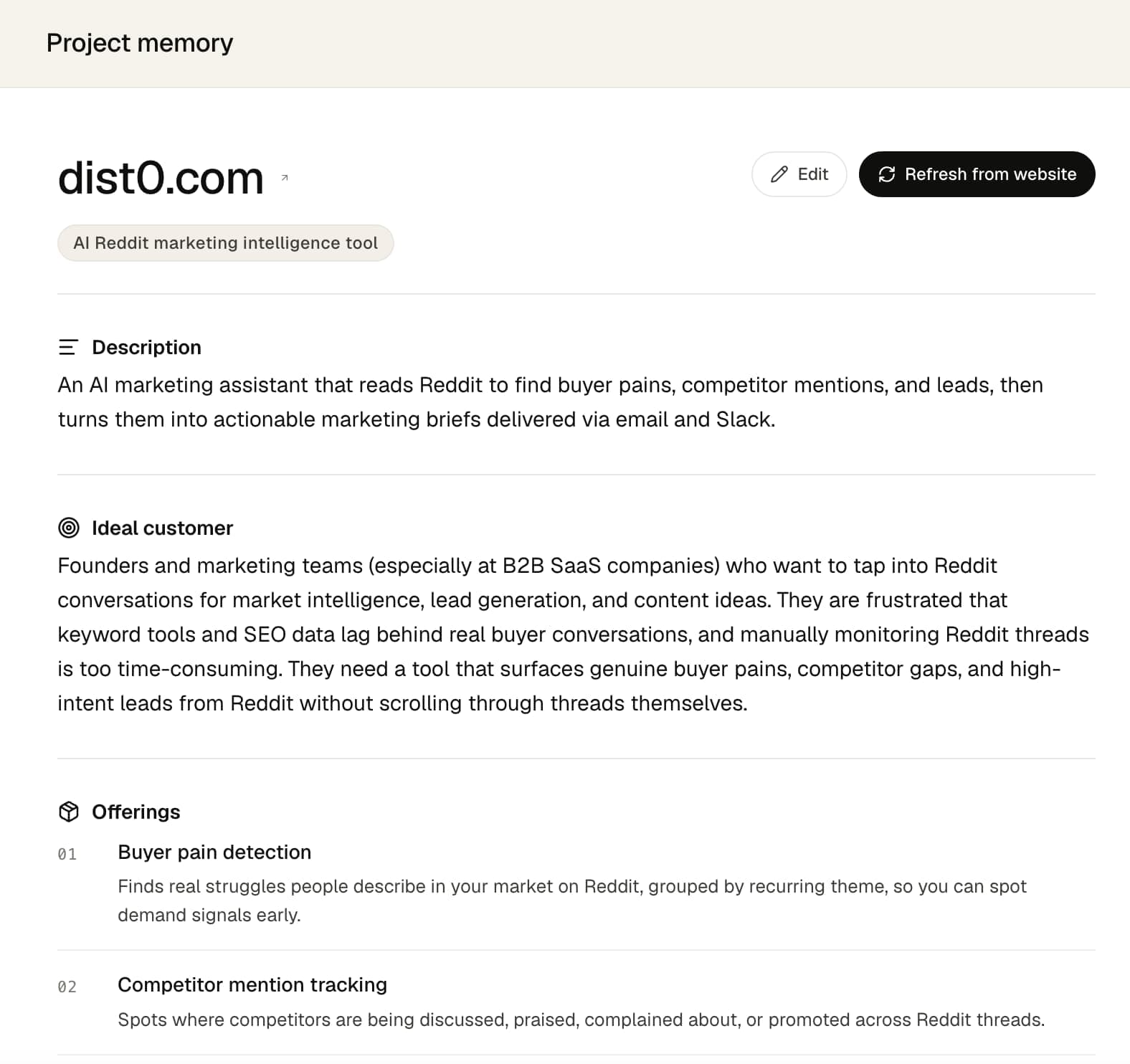
It holds 6 things:
- Description — what your product is, in a sentence or two.
- Ideal customer — who the product is for. This is what drives which communities and conversations count.
- Offerings — the specific products, plans, or services you sell, each with a short note on what it is.
- Competitors — the products you compare against, each with a link and a line on how they compare.
- Watched subreddits — the Reddit communities dist0 reads for you. Your plan sets how many you can watch — see pricing.
- Filter rules — standing instructions for what to skip. See Filter the signals you get.
Alongside these, the page also shows your product name, website, and category. Those are read from your site and aren't edited by hand — see What can't I change? below.
How do I fix something that's wrong?
If a competitor is off, the ideal customer is too broad, or a subreddit isn't surfacing useful conversations, you can correct it yourself. There are two ways.
Option 1: Edit it in the dashboard
This is the direct way.
- Open your project page in the dashboard.
- Click Edit at the top of the memory profile.
- Change any field — rewrite the description, add or remove a competitor or offering, swap a subreddit, or add a filter rule.
- Click Save changes.
Your edits apply right away and shape your next brief.
Option 2: Let an AI agent update it for you
If you use an AI agent — Claude Cowork, or a similar tool — you can let it manage your memory for you. Point it at your own notes (your positioning doc, your competitor list, whatever you keep) and it reads dist0's current memory and makes the changes for you.
You don't have to explain anything technical to it. dist0 hosts a short instruction file the agent reads and follows. Make a dist0 key once, then paste this prompt into your agent — with your own key in place of the placeholder:
Read https://dist0.com/memory-agent.txt and follow it to update my dist0
project memory. My dist0 key is dist0_sk_your-key-here. Here's what to change:
<describe the change, or point it at a file with your latest positioning>To get set up:
- Make a key in the dashboard — see Authentication.
- Paste the prompt above, drop your own key in where the placeholder is, and tell it what to change.
The agent shows you the edits before it makes them. They apply together — all the changes at once — and take effect immediately, exactly as they would from the dashboard. The instruction file works the same with any of these agents.
What can't I change?
A few things aren't edited by hand:
- Your product name and website. dist0 sets these from your site when you first connect it, and they stay fixed after that.
- Your category. This is read from your site too, but Refresh from website re-reads your live site and updates it, along with your profile. The refresh runs before your next brief — the button shows Refresh queued — runs on next digest until then.
- More watched subreddits than your plan allows. You can swap them freely, but your plan sets a cap (see pricing) — once you hit it, remove one to make room for another.
- Your pains, competitor mentions, and briefs. Those are results, not memory. You shape them by editing memory — including its filter rules — not by editing the briefs directly.
FAQ
Do I have to set up project memory myself?
No. dist0 builds it from your website when you connect your site, and we align it before your first brief. Editing it is optional — you only step in when something's off.
Will editing memory change briefs I've already received?
No. Edits shape future briefs. Pains and briefs already in your inbox stay as they were.
What's the difference between editing a field and Refresh from website?
Editing changes one field and leaves the rest alone. Refresh from website throws out the whole profile and rebuilds it from your live site — including replacing anything you set by hand. Edit for a small fix; refresh only when your product has changed.
Can an AI agent manage my memory end to end?
Yes. Give it your dist0 key and point it at dist0.com/memory-agent.txt — a hosted instruction file that works with Claude Cowork or a similar agent. It reads your current memory and makes your changes — the same edits you'd make in the dashboard.